Instagram’s API does not distinguish Trial Reels from other Reels. Because of that, Mintt Instafeed has no way to tell which Reels are Trial Reels, and they can’t be removed one by one.
Trial Reels normally appear when Include all Reels is selected under Posts to show in the Instafeed dashboard, with Own posts selected.
Stop Trial Reels from showing
- Go to Shopify > Apps > Instafeed.
- Under Posts to show, select Own posts.
- Uncheck Include all Reels.
- Click Save feed.
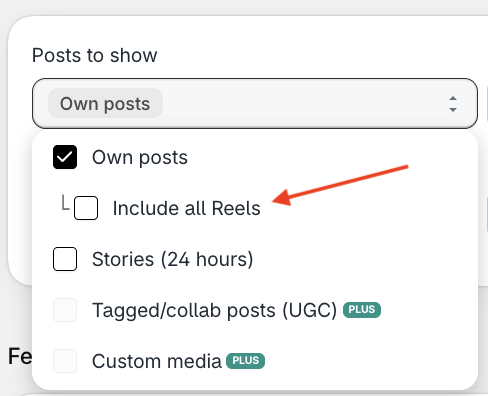
Unchecking Include all Reels should prevent Trial Reels from being shown.
Include all Reels displays Reels that do not appear on your Instagram profile’s main grid, including Reels that are only available from the Reels tab. Leave it unchecked if you only want the Reels that are on your main profile grid.